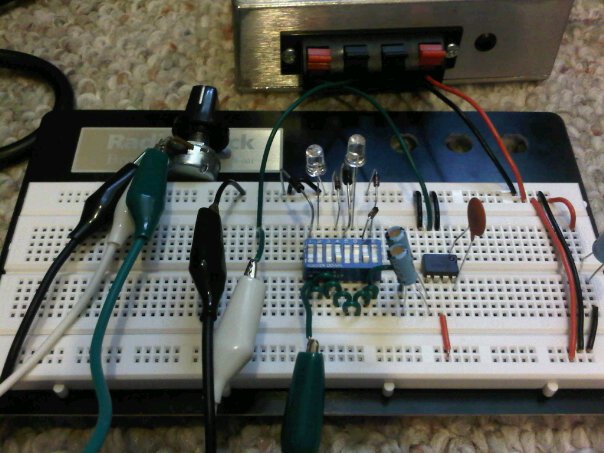
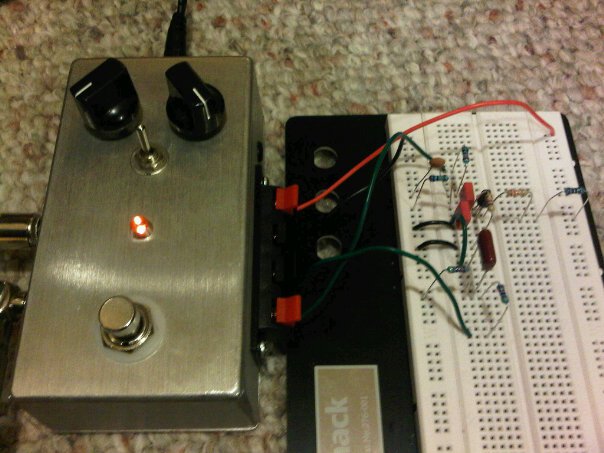
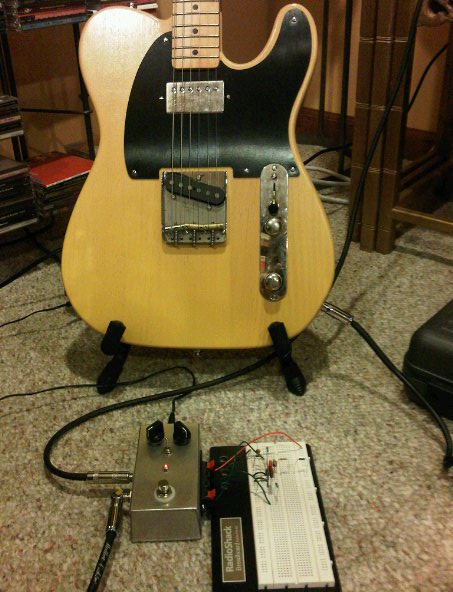
I stumbled across the schematic for Dead Easy Dirt the other day and (a.) it looked like something fun and easy to breadboard, and (b.) it got me thinking about diode clipping.  I cranked out and tested the original schematic last night — basically just an op-amp set for maximum gain straight into symmetrical diode clipping.  It was god-awful, but pretty much what I expected.  The more I monkeyed around with it, the more I caught myself wondering if this was related to the old ProCo RAT circuit.  Sure enough, it’s almost exactly the heart of a RAT using a different op-amp and minus any tone shaping or buffers.*  Cool.

I played around with several diode variations, but ripping them out of and stuffing them back into the breadboard was getting tiresome.  The solution: Simon and I ran to Radio Shack after our coffee date this morning and picked up an eight-position dipswitch.  I spent about a half hour this afternoon reworking the board with the switches, and now I’ve got 16 varieties of diode clipping goodness on tap.

Switch Positions:

  1. 1N4001, anode to ground (because I have a million 1N4001′s lying around)
  2. Red LED, anode to ground (lights up more the harder you drive it — fun!)
  3. Nothing (for single-sided assymetrical clipping, kinda redundant)
  4. 1N914, anode to ground (the original RAT diode)
  5. 1N4001, cathode to ground
  6. Red LED, cathode to ground
  7. Two 1N914′s in series, cathode to ground (for double-sided assymetrical clipping)
  8. 1N914, cathode to ground

Select one switch from switches 1-4 and another from 5-8 and you’re in trashy distortion heaven!

—–

* Also seen in the MXR Distortion+, and I’m sure several other distortion pedals.  So-called overdrive pedals frequently use diode clipping, too, but tend to put it in a less intrusive portion of the signal-shaping circuit.

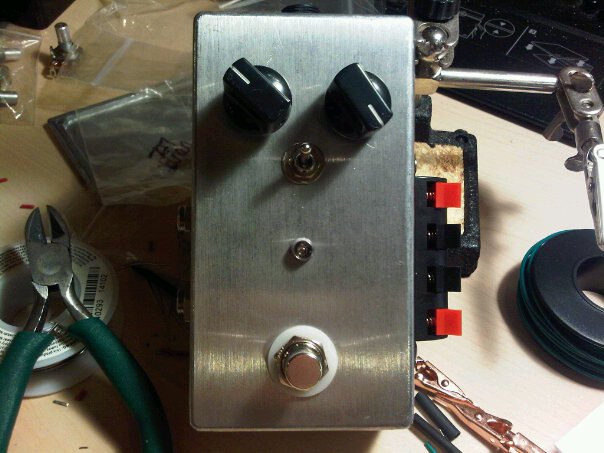
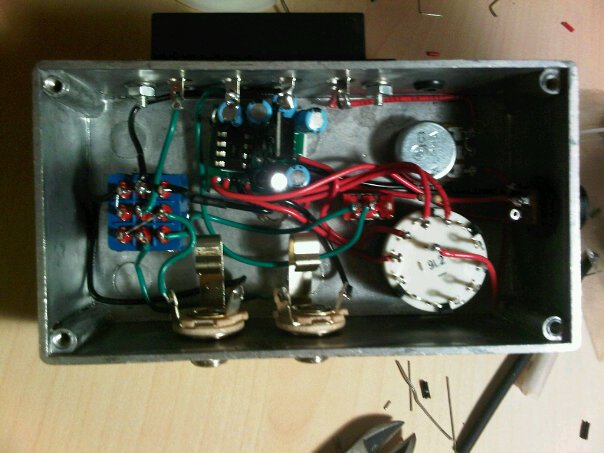
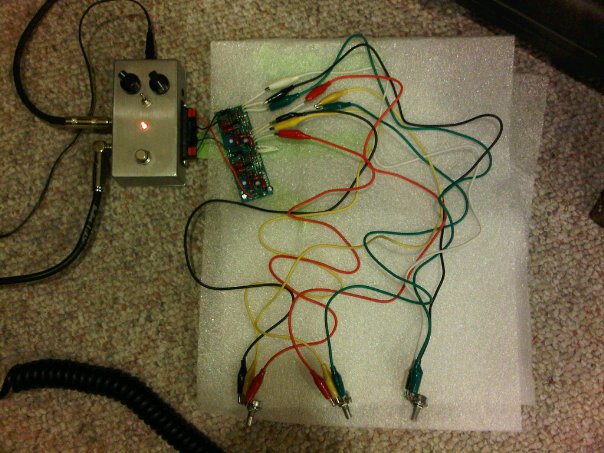
Inspired by the Beavis Board and other similar designs, I finally got around to building my own effects circuit test box.

+9VDC in from an adapter goes to a MadBean Road Rage board, which uses a TC1044 and a voltage regulator to provide 9V, 12V, ~18V and -9V — the leftmost knob is a rotary switch. Power then goes to a voltage sag knob before it heads to the outside world.

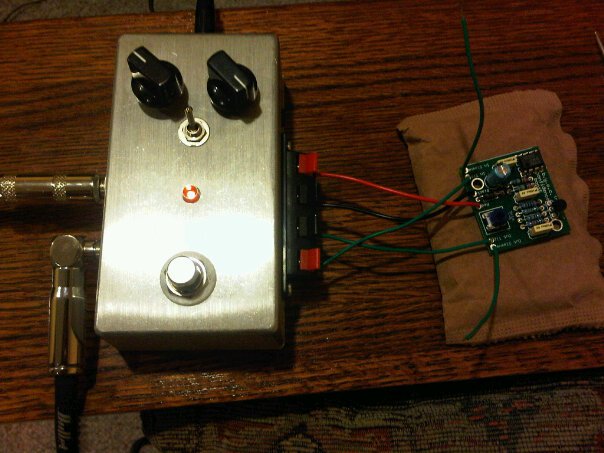
I used a four-output speaker connection panel from Radio Shack for my connections to the external circuit. From top to bottom it goes: power, ground, circuit input, circuit output. The 1PDT switch is there to select whether circuit output or test probe output goes to the out-to-amplifier jack, but I haven’t wired in the test probe yet.

To test the test box, I connected an old BYOC Confidence Booster board I had lying around. Worked like a charm.

Here I am testing Channel 1 of my MadBean Aristocrat board. Sounds great configured for overdrive with a B250K Gain pot. I’ll try the B100K later today.

It’s great to “rock it before you box it”. Not only do you make sure the circuit is functional before you spend a lot of time cramming the board into the enclosure and wiring up the jacks and the switches, but you can make subtle tweaks much more easily, too.

Of course if you really wanna tweak an effects circuit before you even heat up your soldering iron, you can breadboard it first. A friend of mine has expressed interest in the Echoplex preamp booster, so I put this together last night. (Notice that I have the voltage selector knob on the left in 18V position.)

It’s essentially the schematic for the MadBean FatPants board, but I replaced all the potentiometers with median-value resistors.

The problem with working on these guitar projects at night is that, unless you live by yourself in an underground bunker, you can never properly test them at serious volume when you’re finished. I could tell there was a boost, but I couldn’t tell how much it was fattening up the sound or if I even liked it.

Sounded great this morning when I finally had a chance to crank up the amp! I’ll grab some pots and alligator clip leads and head over to my friend’s place later this week to see if he likes it.

Congratulations to the Boston Celtics (including Louisville native and University of Kentucky alumnus Rajon Rondo with 21 points, 7 rebounds, 8 assists and 6 steals) on their huge win earlier tonight against the L.A. Lakers to clinch the 2008 NBA Finals. They’ve had a heck of a season and a heck of a playoffs, and they finished this series out with a heck of a game, blowing out L.A. by a stunning 39 points (131-92).

Now I can finally get some sleep this year. This Eastern timezone up ’til midnight stuff has been killing me.

Shortly after the big server rebuild a few weeks back I was examining the web server logs and I noticed that several sites were stealing okcomputer.org bandwidth by linking images from the okcomputer.org Photo Gallery directly into their web sites. This is just a tacky thing to do on numerous levels. In the past, I’ve had people contact me and ask for permission to use an image from the Photo Gallery, and I’ve always been happy to direct them to the photo’s owner. If they are given permission, I expect them to download a copy of image file and serve it directly from their own server. Otherwise, every hit to www.jack.ass causes a hit on my web server and uses some of my bandwidth.

So while I was rebuilding the web server I implemented a very common Apache mod_rewrite recipe so that these bandwidth thieves would get a very different image than the one they linked to. I didn’t do anything gross — just a small version of the pic of me playing the ukulele that I drag out every now and then. I week later I checked in on one of the bandwidth thieves’ web sites — a tourism site for some city in the Netherlands — and there I was wailing away on the uke. Not only was my recipe working, but this doofus hadn’t even noticed it yet.

As usual, I (a.) didn’t think this one through very well, and (b.) forgot I had even done it. That is until my dad tried to print some Photo Gallery photos through Shutterfly the other night. Luckily I was watching over his shoulder. Still, I was stumped for at least 8 seconds when the picture of Simon that my dad had selected showed up as me and my uke on Shutterfly.

Fixed now. As much fun as implementing this type of recipe always sounds when you read about it, it’s almost always more trouble than it’s worth. Almost.

Remember a few weeks ago when I was having all the wireless troubles?  The problem seemed to go away for a bit, and then WHAMMO!  It bit me again recently…again when I was downstairs in the living room.

Jessica heard me crying about it and mentioned that she had been having the same problem for the last few weeks.  What?!  Why hadn’t she mentioned this?  Dunno, but at least now I could eliminate my own laptop as the problem and concentrate on debugging a general wifi problem in the house.

The problem really only happened at DHCP lease acquisition time.  Once either of us had a lease we could roam all over the house, but successfully acquiring a lease in the first place was really only working upstairs.  Hmmm….

Well, apologies to all you potential Encyclopedia Browns out there, but you havn’t been given all the facts — because I had forgotten about one very important one: I had installed a Linksys WRE54G Wireless Range Extender for Jessica when she moved her office to the basement about two years ago.  Honestly, I had forgotten all about it.  I mean, I saw it every now and then, but I never bothered to think about what it was doing.  Or what it wasn’t doing.

One unplugged WRE54G later and Jessica and I are both acquiring DHCP leases all over the house again.  Apparently we were trying to associate with the range extender when our wireless interfaces were reconfiguring, and it must not have been bridging correctly with the router since I installed the new firmware.

I don’t know if we even need the range extender anymore since now that I’m running DD-WRT on my WRT54G I’m transmitting at 84 mW (instead of the default 28).  I’ll play around with connectivity in the basement this weekend, and if I still need the range extender I’ll configure WDS Bridging between it and the router so that they play together nicely this time.

I’ve spent the last few days investigating Plone as a potential replacement for WordPress for the okcomputer.org web site, but, as is frequently the case when experimenting with new technology around here, I’ve been beating my head against the wall trying to get my Plone installation to work behind an Apache proxy. I could successfully pull up the main page’s content in my browser, but none of the Cascading Style Sheets or Javascript files were making it. The result was less than inspiring. So while I was waiting for the tornadoes to pass through tonight, I fired up my browser, tailed my log files and started beating on it.

First off, the mod_rewrite rule from the RewriteRuleWitch wasn’t matching. Fantastic. Here’s what it gave me:

RewriteRule ^($|/.*) \
 
http://127.0.0.1:8080/VirtualHostBase/\
 
http/%{SERVER_NAME}:80/okcomputer/VirtualHostRoot$1 [L,P]

The root document was matching, but nothing else was. After setting my RewriteLogLevel to 9, I saw that the URI as it was being tested against the regex didn’t begin with a /. So I removed the slash from the regex and added one to the substitution pattern:

RewriteRule ^($|.*) \
 
http://127.0.0.1:8080/VirtualHostBase/\
 
http/%{SERVER_NAME}:80/okcomputer/VirtualHostRoot/$1 [L,P]

Now the RewriteRule was matching, but the proxied requests were generating 400 errors on the Zope HTTP server. The obvious culprits were the spaces in some of the URL’s, specifically in URL’s containing the string “Plone Default”. My browser was (correctly) escaping the spaces as “%20″, but by the time mod_rewrite had processed the request and passed it on to mod_proxy the spaces were back resulting in a malformed HTTP request.

I found the fix for this last bit at Velo World. The trick is to define a RewriteMap and then use mod_rewrite’s built in escape function, like so:

RewriteMap escape int:escape
...
RewriteEngine On
RewriteRule ^($|.*) \
 
http://127.0.0.1:8081/VirtualHostBase/\
 
http/%{SERVER_NAME}:80/okcomputer/VirtualHostRoot/${escape:$1} [L,P]

And success! But what a pain in the ass! I’d love to blame mod_rewrite, but I’m sure there’s some valid reason it doesn’t re-escape substitutions by default. Instead I’ll blame Plone. Why? Why do you put spaces in your %$#@! URL’s. And given the number of pages on the web explaining how to set up Plone behind an Apache server with mod_rewrite and mod_proxy — including Plone’s own documentation — how come none of them mentioned this? Very frustrated, but the problem is fixed, the tornadoes have passed, it’s going on 2:00 AM, I’m going to bed.

UPDATE 2/14/2008: Special thanks to Sascha, who’s been helping me debug my RewriteRule issue.  The Witch’s rule should work, I just can’t figure out why apache is stripping that slash of the front of my URI’s.  I’m not using a RewriteBase, and the RewriteRule isn’t an a .htaccess file, so I just have no idea what the problem is.

After the filesystem crash back in October I had 11 gigabytes worth of files without meaningful names just sitting in a lost+found directory. I was forced to come up with some creative ways to salvage data.

$ find lost+found/ -type f | wc -l
79370
$ du -sh lost+found/
11G     lost+found/

One of the first things I thought people might want access to would be their digital photographs, so I decided to cook up a little program to sort through the entire lost+found directory, find JPEG’s with a “Camera Model” EXIF tag and then copy them into an appropriate directory based on the value of that tag.

My first attempt used the shell, but that proved unacceptably slow so I fell back to my good friend Python. I installed the Python Image Library (python-imaging in Ubuntu), which I used to identify the JPEG’s (very fast, by the way), and which also has (kludgy, experimental) support for reading EXIF tags.

Here’s the code:

#! /usr/bin/python
 
import sys
import os
import Image
from ExifTags import TAGS
from shutil import copyfile
 
INDIR = 'lost+found'
OUTDIR = 'recovered-photos'
 
def recover_photo(infile, outdir):
    try:
        im = Image.open(infile)
 
        if im.format == 'JPEG':
            tags = {}
            exif = im._getexif()
 
            for tag, val in exif.items():
                lookup = TAGS.get(tag, tag)
                tags[lookup] = val
 
            dirname = tags['Model'].strip()
            dirname = dirname.replace(' ', '_')
            outdirname = os.path.join(outdir, dirname)
 
            if not os.path.isdir(outdirname):
                os.makedirs(outdirname)
 
            outfile = os.path.basename(infile)
 
            if not outfile.endswith(('.jpg', '.JPG')):
                outfile = outfile + '.jpg'
 
            outfile = os.path.join(outdirname, outfile)
 
            copyfile(infile, outfile)
            print infile, '->', outfile
 
    except IOError, v:
        try:
            (errno, errmsg) = v
        except:
            errmsg = v
        print infile, errmsg
    except:
        print infile, 'unknown error'
 
for root, dirs, files in os.walk(INDIR):
    for name in files:
        infile = os.path.join(root, name)
        recover_photo(infile, OUTDIR)

After running for 28m18s:

$ ls -l recovered-photos/
total 492
drwxr-xr-x 2 matthew matthew  4096 2008-01-26 13:58 C2100UZ
drwxr-xr-x 2 matthew matthew  4096 2008-01-26 14:18 C3100Z,C3020Z
drwxr-xr-x 2 matthew matthew 12288 2008-01-26 14:18 C860L,D360L
drwxr-xr-x 2 matthew matthew 36864 2008-01-26 14:17 C960Z,D460Z
...
$ find recovered-photos/ -type f | wc -l
9293
$ du -sh recovered-photos/
7.3G    recovered-photos/

9293 digital photographs all nicely sorted.

I’ll clean the code up, flesh it out with some handy command-line args and post a link to the updated version here as soon as I have a few spare cycles.

For some unknown reason, I got vaguely interested in Gravatars this week. I’ll spare you the Google search — Gravatars are Globally Recognized Avatars. (And for you total lame-os, avatars are the little pictures next to people’s names in some forums and blog comments.) The idea is that you upload your avatars to gravatar.com and associate them with your email address (which just happens to be a globally unique identifier that you’ve probably already provided to most systems you use), and then services that are configured to use Gravatars can always pull your latest and greatest avatar from a central repository. Rocket science it ain’t.

PG GravatarG GravatarFirst, I set up a couple of Gravatars myself: one rated PG (I’m holding a beer), another rated G of me playing the ukulele at Ian and Christine’s wedding party. I’m not sure why I bothered as I don’t really post to any forums these days, but they’re there.

Next, I spent about three minutes setting up the Easy Gravatars WordPress plugin over on Kid Amnesiac. Man, does Easy Gravatars live up to its name! Not much flexibility, but a default setting that was perfect for my needs. (The only tweaks I made were to change the URL for the default image for missing Gravatars to one being served off my own server and then to set the default maximum-naughtiness rating to PG.)

Here’s the kicker: not a single person who has posted comments to Kid Amnesiac has a Gravatar. I checked ‘em all. Nothing. I even posted a comment myself (since deleted) just to see if the plugin worked (it did). I figured at least one person (*cough* Diana *cough*) would have a Gravatar. Nope. None. So that was a bummer.

I’m leaving the plugin enabled in hopes that someone might read this and go nuts and actually set up a Gravatar. Please, make me feel useful. Oh, and I suppose I should set the plugin up for matthewwhitworth.com, too.

All okcomputer.org services and accounts have been migrated to the new okcomputer.org server, firefly, for a couple of weeks now, so today I started work on decommissioning the old server, serenity. Normally I’d wipe the disks like so:

# dd infile=/dev/urandom outfile=/dev/hda1

But that has been complicated by the annoying fact that the hosting company built the OS on a single disk partition. An attempt to destroy the contents of hda1 would risk causing an
operating system crash before all the contents had been destroyed.* If I had physical access to the server I could boot from a live CD and have a free go at the hard drive, but that isn’t an option. I needed a tool that would give me some precision as to what I was destroying.

I’ve opted to use shred, a program included in the coreutils package that writes random data over a file’s bytes. Learning about shred was funny because there is a lot of misinformation out there. Its primary weakness is that it assumes that the filesystem overwrites data in-place, and not all modern filesystems do that — in fact most modern filesystems don’t do that. serenity used the ext3 filesystem, and there’s quite a number of people screaming on the ‘Net that shred is ineffective on ext3 filesystems. Well, I actually R’ed the FM, where I learned that ext3 filesystems are only problematic to shred in data=journal mode (not the default). Seems I was all clear.

I couldn’t shred the entire filesystem or I would find myself in the same conundrum as if I had used the dd method, so I decided to concentrate on user data, databases, certificates and system passwords. After that I could let loose a more dangerous (but less precise) method and call it a night.

shred’s other weakness is that it was designed to be used on single files (or whole filesystems via their device files) rather than recursing through a directory tree like “rm -Rf”. So I wrapped it in a find statement and then deleted the empty user home directory trees by hand before deleting each user’s account. Actually the whole thing can be neatly wrapped up in some awk:

# for u in `awk -F ':' '$3 <= 1000 && $3 > 65534 { print $1 }' /etc/passwd`; do
> find / -type f -user $u -exec shred -n 3 -zu {} \;
> rm -Rf /home/$u
> deluser $u
> done

So serenity has been wiped clean. I’m going to call the hosting company in just a bit and terminate service. Everything is chugging along on firefly. Our long national nightmare is over.

* I don’t really know if this is true, but it seems a good guess. Input appreciated.

Kid Amnesiac, Jessica’s blog about Simon, has always been cursed with lots of comment spam, which I had never really bothered to investigate. It was easier to simply mark the offending comments as spam every time I logged in and move on, especially since the spam comments always required moderation and never actually made it out to the viewable part of the blog.

When I had originally built Kid Amnesiac, I had required all comments to come from registered users and forced moderation on every registered users’ first posts. This seemed the most flexible balance between making it easy for users to post comments and not being overrun with spam. Since all of the comment spam was ending up in Moderation I assumed that the spam bots were actually registering as users before they posted, but a quick review of the Users page made it obvious that that was not the case. A few days ago it occurred to me that the spam must be Trackbacks, so I went into the Discussion Options configuration page and disabled them.

But the spam kept coming. In fact, in just the last three days it had dramatically increased. So this morning I decided to check how trackbackability was enabled in the database. “DESCRIBE wp_posts;” showed that there was a column named ping_status, described as “enum(‘open’,'closed’)”. Armed with that information it was easy to see what was going on.

mysql&gt; SELECT post_title, post_date
-&gt; FROM wp_posts
-&gt; WHERE ping_status = 'closed'
-&gt; ORDER BY post_date ASCENDING;
+-----------------------------------+---------------------+
| post_title                        | post_date           |
+-----------------------------------+---------------------+
| Fifteen Months and a Growth Spurt | 2008-01-18 12:19:38 |
| These Shoes Were Made for Walking | 2008-01-19 21:43:23 |
+-----------------------------------+---------------------+
2 rows in set (0.00 sec)

The configuration change I had made had only affected the posts that were published after the modification, so now it was up to me to change the ping_status for all of the previous posts in the database.

mysql&gt; UPDATE wp_posts
-&gt; SET ping_status = 'closed'
-&gt; WHERE ping_status = 'open';
Query OK, 299 rows affected (0.01 sec)
Rows matched: 299  Changed: 299  Warnings: 0

mysql&gt; SELECT post_title, post_date
-&gt; FROM wp_posts
-&gt; WHERE ping_status = 'open';
Empty set (0.00 sec)

Perfecto! Remember, kids, always back up your WordPress database before monkeying around in it. If you screw it up, your wife may stab you.

Next Page »